I teach bloggers and content creators how to turn their content into income, and LinkedIn keeps coming up in my community. People want to show up there consistently, and they run out of hours in the week. It is one of the best places for bloggers and creators to build an audience, which is exactly why showing up there inconsistently hurts.
So in this series on using agentic AI for each social platform, I want to walk you through exactly how I use Claude in Chrome for LinkedIn. This is a practical, over-the-shoulder walkthrough with real prompts you can copy.
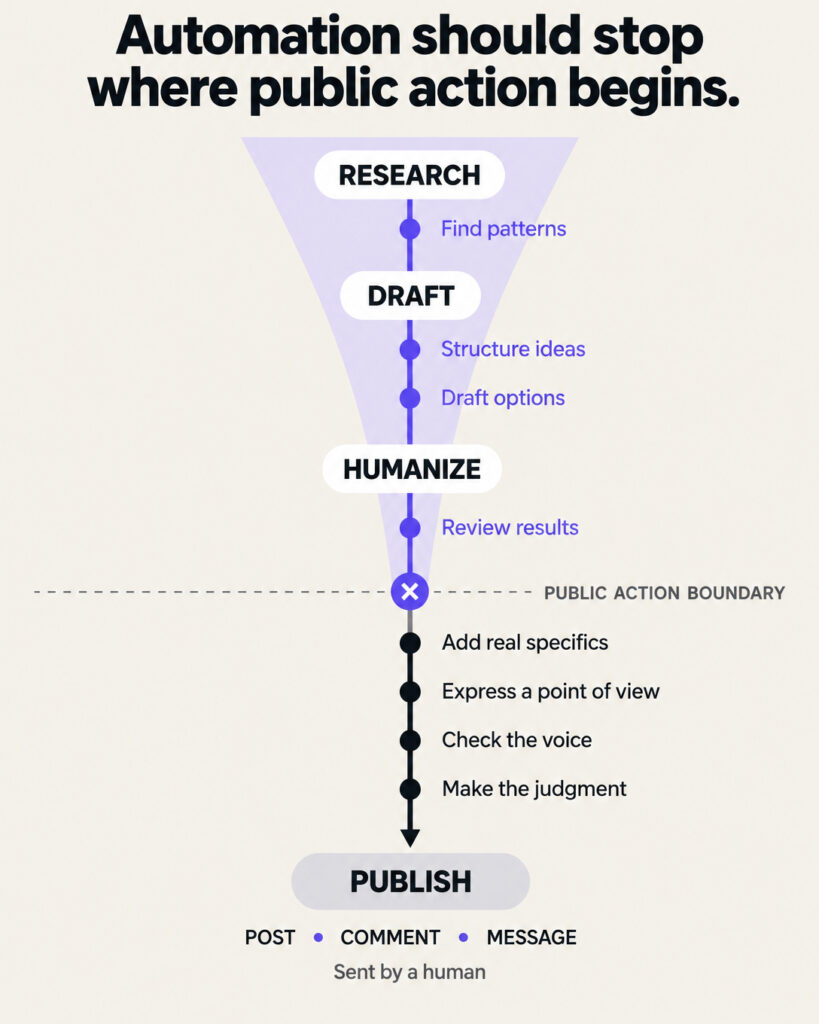
One rule shapes everything in this article: Claude drafts, you decide. You review every word before anything goes live, and you press every publish button yourself. That single rule keeps your account safe and your voice intact.
What Claude in Chrome Actually Is
Claude in Chrome is Anthropic’s browser extension. It lives in a side panel in Chrome, and with your permission it can read the page you have open, click buttons, type into fields, fill out forms, and move between tabs. It reads the resulting page before deciding its next step, which makes it an agent rather than a chat window. You can find the full capability rundown in this extension guide.
In August 2026, Anthropic upgraded the side panel to run full Claude Cowork sessions. It’s available on Max and Team plans, with Pro rolling out over the following weeks. Anthropic built in guardrails: the extension asks permission before high-risk actions, and you can block it from specific sites in settings, as covered by TechCrunch. Plan availability and features change often, so check Anthropic’s current documentation before you rely on a specific capability.
For LinkedIn, this matters because Claude can look at your actual profile, your actual feed, and your actual analytics while you work. You skip the copy-paste dance of a regular chatbot.
First, Know LinkedIn’s Rules
Before any workflow, you need the guardrails.
LinkedIn’s User Agreement, Section 8.2, prohibits bots and automated methods for accessing the service, adding contacts, or sending messages. A separate Help Center policy bans third-party crawlers, plug-ins, and extensions that scrape or automate activity. Testing across 50 accounts showed a 23% restriction rate within 90 days for accounts using automation, according to this automation analysis. Policies get updated, so read LinkedIn’s current User Agreement and help center policies before you use any tool on the platform.
To stay on the safe side, use Claude only as a drafting and analysis assistant. Here is how I stay safely inside the lines:
-
Claude never posts, comments, connects, or messages on my behalf. It drafts in the side panel or a document. I paste and publish manually.
-
Claude reads pages I already have open. I use it to summarize and analyze what is in front of me, in the same way my own eyes would.
-
I keep human pacing. Safe activity guidance suggests staying under 20 to 25 connection requests a day, keeping weekly invites under 100, and holding pending invites below 500. Above all, avoid high volumes of connection requests or other repetitive activity that could look automated.
Think of Claude as an assistant sitting next to you, with you at the keyboard for anything that touches the publish button.
Workflow 1: Optimize Your Headline and About Section
Your profile is the landing page for everything else you do on LinkedIn, so I start here. Personal profiles average 2.6% engagement versus 1.74% for company pages, so your personal profile earns the investment.
The process
Open your own LinkedIn profile in Chrome. Open the Claude side panel. Then use a prompt like this:
“Read my LinkedIn profile on this page. My audience is bloggers and online entrepreneurs who want to build income from their content. Rewrite my headline in 3 versions: one outcome-focused, one credibility-focused, one curiosity-focused. Then rewrite my About section in first person, conversational, under 200 words, ending with one clear next step for the reader.”
Claude reads your real profile, so the drafts build on what you actually have instead of generic filler.
What to keep human
Your specific numbers, your real story, and your personality. Add the detail only you know: the first product you sold, the month your blog income replaced your paycheck, the niche you serve. AI drafts read flat on the first pass. Your specifics fix that.
Workflow 2: Research What Your Audience Engages With
Good content starts with knowing what your people respond to.
Scroll your feed or open the profiles of 3 to 5 creators your audience follows. With a post visible on screen, ask:
“Look at the posts visible on this page. For the ones with the most engagement, tell me: the topic, the opening line style, the format (text, image, carousel, video), and the type of comments they attract. Summarize 3 content themes my audience of bloggers responds to.”
One data point to carry into this research: LinkedIn carousel posts, meaning PDFs uploaded natively, lead every format with a 7.00% average engagement rate, up 14% year over year. Video, images, and text posts grew too. When Claude confirms a theme, carousels are a strong first format to test, though results vary by audience.
💡 Tip: Do this research weekly for a month. You will build a short list of proven themes for your niche, which makes every future drafting session faster.
Workflow 3: Draft Text Posts and Carousels in Your Voice
This is where the fear of sounding like a bot gets real, and the data backs up that fear.
LinkedIn works to reduce the reach of generic, templated content. Industry reports describe detection systems that catch generic AI content at 94% accuracy, and a March 2026 Authenticity Update that penalizes generic AI content with up to 47% less organic reach. LinkedIn does not publish its ranking formula, so treat those figures as reported estimates. The signals described include repeated phrasing, predictable hook-point-CTA structure, flat emotional tone, and a lack of real names, dates, and situations.
So the job is to feed Claude your voice and your specifics up front.
The voice-first prompt
“Here are 3 LinkedIn posts I wrote that performed well: [paste them]. Study my sentence length, word choices, and tone. Now draft a post about [topic] in my voice. Include a placeholder like [INSERT PERSONAL EXAMPLE] wherever a real story from me would make it stronger. Vary the structure so it does not follow a standard hook-point-CTA template.”
The carousel prompt
“Turn this outline into a 9-slide LinkedIn carousel. Slide 1 is a bold promise. Slides 2 through 8 each carry one idea in under 25 words. Slide 9 invites a comment. Write it in my voice based on the samples I shared.”
Then you do the human pass:
-
Fill every placeholder with a real story, a real number, a real client situation.
-
Rewrite any sentence you would never say out loud.
-
Add one moment of genuine uncertainty or opinion. The detection systems flag unnaturally steady professional tone, and real humans have range.
Workflow 4: Repurpose a Blog Post into LinkedIn Content
This workflow is my favorite, because it turns an asset you already own into fresh distribution.
Open your blog post in one Chrome tab. Then prompt:
“Read the blog post in this tab. Create 3 pieces from it: (1) a 150-word LinkedIn text post sharing the single most surprising insight, (2) a carousel outline covering the step-by-step process, and (3) a LinkedIn article draft of 600 words that teases the full post and links to it. Keep my voice from the samples I gave you earlier.”
Because Claude reads the live page, it pulls your actual arguments and examples instead of inventing new ones. One blog post becomes a week of LinkedIn content, and every piece points traffic back to the asset that earns for you.
Workflow 5: Prepare Comment Drafts You Personalize
Comments can build visibility faster than posts for newer accounts, and this is also the riskiest place to lean on AI. LinkedIn discourages bulk comments and replies that simply restate the original post, and its detection reportedly targets them specifically.
So I use Claude for thinking support, with strict rules. With a post open:
“Read this post. Give me 2 angles for a comment that adds a perspective the author did not cover, based on my experience teaching bloggers to monetize. Give me angles and talking points only. I will write the comment myself.”
Notice the framing. Claude supplies the angle. You write the words. A comment that references your real experience, disagrees respectfully on one point, or adds a specific example is the kind of comment that earns profile visits.
⚠️ Warning: Never paste AI comments in bulk across multiple posts. Restated-post replies and templated comments sit at the center of what LinkedIn’s detection is reported to catch.
Workflow 6: Review Your Post Analytics
Data closes the loop. Open your LinkedIn analytics page and prompt:
“Read the analytics on this page. Rank my last 10 posts by engagement rate. Identify what the top 3 share in terms of topic, format, and opening line. Identify what the bottom 3 share. Give me 3 specific adjustments for next week’s content.”
Run this review every week or two. Over a month, you build a documented picture of what works for your specific audience, and your content decisions stop being guesses.
What to Keep Human, Always
A quick summary of the line I never cross:
-
Publishing. Every post, comment, and message goes out by your hand.
-
Stories and specifics. Real dates, names you have permission to use, actual numbers.
-
Opinions. Your stance on debates in your niche comes from you.
-
Relationships. DMs and connection notes stay fully handwritten.
-
Final voice check. Read the draft out loud. If a line sounds off, rewrite it.
Claude handles structure, research, first drafts, and analysis. You handle judgment, personality, and the publish button. That split keeps you efficient and keeps you sounding like yourself.
FAQ
Is using Claude in Chrome against LinkedIn’s rules?
Using Claude to draft, summarize, and analyze while you publish manually keeps you within the rules. LinkedIn prohibits tools that automate activity, scrape data, or act on your behalf. The approach in this article keeps every account action in your hands.
Will LinkedIn penalize my AI-assisted posts?
LinkedIn’s systems target generic AI content with no unique perspective, and flagged content reportedly loses up to 47% of organic reach. Posts built on your real stories, specific numbers, and personal voice tend to perform better than generic ones. The personalization pass in Workflow 3 exists for exactly this reason.
Which Claude plan do I need?
The current side panel experience is available on Max and Team plans, with Pro rolling out after the August 2026 update. Enterprise admins can turn it on for their organization. Plan availability changes often, so check Anthropic’s help center for the latest plan details.
Which LinkedIn format should I start with?
Carousels, meaning PDFs uploaded natively, lead all formats at a 7.00% average engagement rate. Text posts cost the least time to produce, and carousels take more effort, so a mix of weekly carousels plus 2 to 3 text posts is a strong starting cadence. Results vary by audience, so let your own analytics guide adjustments.
Can Claude post for me while I sleep?
Technically the extension can click and type with your permission. I strongly advise against it for LinkedIn. Automated posting violates the User Agreement, and one automation test reported a 23% account restriction rate within 90 days. Drafting in advance and publishing manually takes two extra minutes per post.
Your Next Step
Start with one workflow this week. I recommend the profile optimization, because it takes 30 minutes and improves everything else you do on the platform.
Then layer in the repurposing workflow, because it turns the blog content you already own into consistent LinkedIn presence. That is the whole philosophy behind what I teach at Weekend Side Hustle: build the asset once, then put systems around it that keep it earning attention and income for you.
The tools got dramatically better this year, and they keep improving. The fundamentals held steady. Your voice, your stories, and your judgment remain the product. Claude just helps you ship them faster.