I spend a lot of time teaching bloggers how to turn content into income. One thing keeps showing up in my own workflow: X is a great traffic and relationship channel, and it eats hours if you manage it manually.
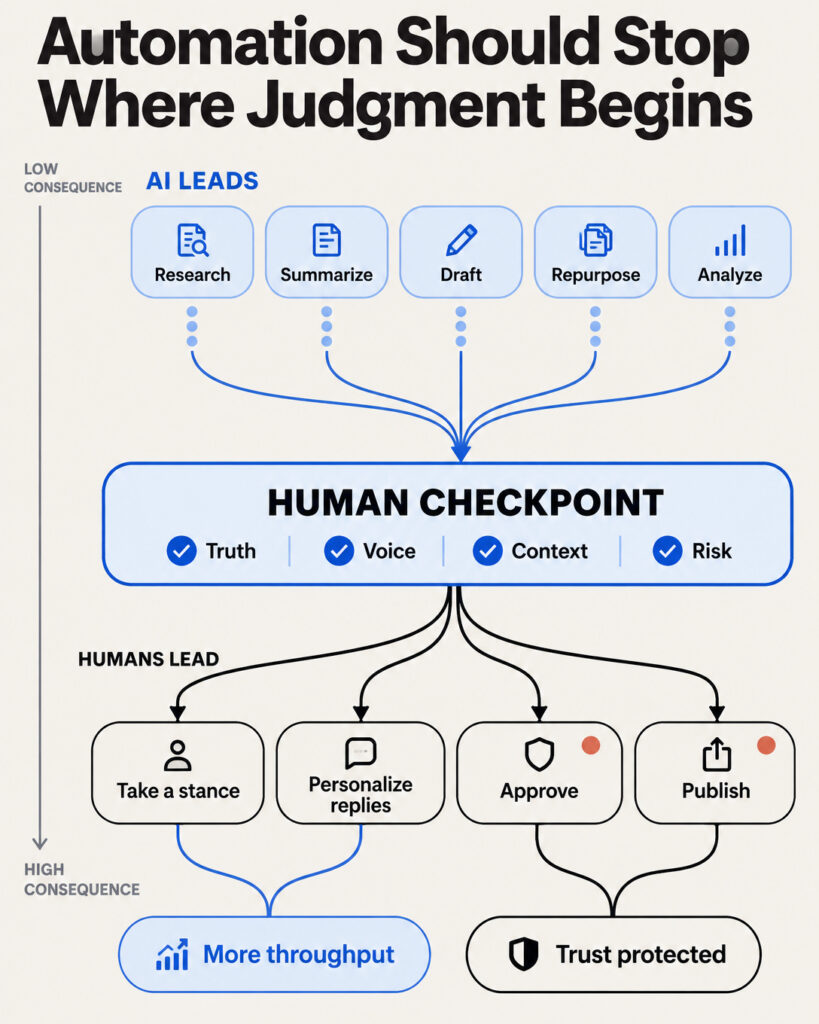
So I started using Claude in Chrome to handle the repetitive parts. The research, the first drafts, the repurposing, the bookmark cleanup. I keep the judgment calls and the actual posting for myself.
In this guide I’ll show you exactly how I set it up, the prompts I use, and the rules you need to follow so your account stays safe. This is part of my series on using agentic AI for each social platform, and X is where the system pays off fastest.
What Is Claude in Chrome?
Claude in Chrome is Anthropic’s browser extension. It lives in a side panel inside Chrome and works on the pages you already have open.
With your permission, it can read what’s on the screen, click buttons, type into fields, and navigate between pages. You talk to it in plain English, and it carries out multi-step tasks like filling forms, extracting data, and running workflows across tabs. Having the AI inside the browser removes the constant copy-paste between a separate AI app and your active tabs, as this extension overview explains well.
That shift matters. A regular chatbot writes text for you. An agent in your browser works alongside you on the actual page where your content lives.
Anthropic built guardrails into this. You control which sites Claude can access, it asks permission before high-risk actions, and the company has added prompt injection defenses that cut attack success rates significantly. Even so, I recommend you watch it work the first few times. Trust builds through observation.
Who Can Use It and What It Costs
Claude in Chrome is available to all paid Claude subscribers. Current plan pricing looks like this:
-
Pro: $20/month, enough for most solo creators
-
Max 5x: $100/month for heavier daily use
-
Max 20x: $200/month for power users and teams
The free tier gives you Claude Sonnet with usage limits, and the browser extension itself requires a paid plan. Availability and pricing change often, so check Anthropic’s current pricing and documentation for what each plan includes before you subscribe. For a tool that replaces hours of weekly social media admin, the Pro plan earns its keep quickly.
Why This Matters for Content Creators Right Now
AI assistance is quickly becoming the baseline for content work rather than an edge, and industry surveys put numbers on it. One roundup reports that 94% of marketers plan to use AI for content creation in 2026, About 69% expect agentic AI to help with research and knowledge retrieval, and teams using these tools report editing time cut by up to 73%.
The distinction worth understanding: generative AI produces content. Agentic AI produces content and then does something with it. It handles the handoffs and the busywork while you keep your attention on judgment and strategy.
For a blogger building an income-producing asset, that means your X presence stops competing with your blog for time. Both get done.
Six Practical Workflows for Managing X with Claude in Chrome
Here are the exact workflows I use, with prompts you can copy. Open X in a tab, open the Claude side panel, and work through them one at a time.
1. Research Trending Topics in Your Niche
Before I write anything, I want to know what my audience is already talking about. Claude can read your X feed, search results, and the Explore tab, then summarize what it finds.
Example prompt:
“Browse the search results for ‘blogging income’ and ‘content monetization’ on X. Summarize the 5 most discussed angles from the past few days, note which posts got the most engagement, and suggest 3 topic ideas I could post about this week.”
This can turn 45 minutes of scrolling into a 3-minute briefing. You get the signal without the doomscrolling.
2. Draft Posts and Threads in Your Voice
Generic AI posts get ignored. The fix is giving Claude real samples of your writing before it drafts anything.
Example prompt:
“Here are 5 of my recent X posts [paste them]. Study the tone, sentence length, and structure. Now draft 3 post options about why beginner bloggers should pick one monetization method before adding more. Match my voice. Keep each under 280 characters.”
For threads, add structure:
“Draft a 7-post thread on how I turned my blog into recurring income. Post 1 is the hook, posts 2 through 6 are one actionable step each, post 7 invites replies. Write it in my voice based on the samples above.”
💡 Tip: Save your voice samples in a note so you can paste them into any new session. Consistency in input creates consistency in output.
3. Repurpose a Blog Post into a Thread
This is my favorite workflow, because it turns an asset you already own into fresh distribution. Since Claude works in your browser, it can read your published blog post directly.
Step by step:
-
Open your blog post in one tab and X in another.
-
Open the Claude side panel.
-
Use this prompt:
“Read the blog post in my other tab. Pull out the 6 most valuable takeaways and turn them into an X thread. Hook first, one idea per post, end with a post that links back to the full article. Keep my voice from the samples I gave you.”
One blog post becomes a thread, and that thread drives readers back to the asset that actually earns for you. That loop is the whole point of repurposing.
4. Draft Replies for You to Review
Replies build relationships, and relationships build audiences. Claude can read a conversation and draft a thoughtful response, which you then edit and send yourself.
Example prompt:
“Read this post and its replies. Draft 2 reply options for me: one that adds a practical tip from my experience, one that asks a genuine follow-up question. I’ll pick, edit, and post it myself.”
That last sentence is deliberate. X’s systems detect and devalue AI-generated replies aggressively, so replies deserve the most human involvement of anything on this list. More on the rules below.
5. Organize Bookmarks and Lists
Bookmarks pile up fast. Claude can navigate your bookmarks page and bring order to the chaos.
Example prompts:
“Go through my X bookmarks. Group them into categories like content ideas, tools to try, and accounts to study. Give me a summary of each group.”
“Review the accounts I follow and suggest a list of 20 creators in the blogging and online business space worth adding to a private list called ‘Engage Daily.'”
A curated engagement list means you show up in the right conversations every day instead of whatever the algorithm serves you.
6. Review Your X Analytics
Open your analytics dashboard and let Claude read the numbers with you.
Example prompt:
“Read my X analytics for the past 28 days. Which 5 posts performed best on impressions and engagement? What topics and formats do they share? Suggest 3 experiments for next month based on what’s working.”
This turns raw data into a content plan. Run it monthly and your posting decisions start compounding.
What You Should Keep Human
I run a documented system here, and the system includes hard boundaries. These stay with you:
-
Final approval before anything posts. Read every draft. Edit it. You press the button.
-
Real engagement. DMs, meaningful replies, and relationship-building come from you personally.
-
Fact-checking. Verify any claim or number before it goes out under your name.
-
Your opinions. Claude can structure an argument. The actual stance belongs to you.
The research backs this up. The most effective content teams use agents to accelerate production while keeping human oversight on quality, accuracy, and brand alignment. Your audience follows you for your judgment. Protect it.
X Automation Rules and Account Safety
This section matters more than any prompt in this article. X restricts unauthorized automated behavior, and its enforcement got dramatically stricter in 2026, with ban waves hitting accounts using unauthorized tools. Rules change, so check X’s current automation rules before you automate anything. Here’s the general picture of what the platform rules allow and prohibit.
What X Permits
-
Scheduling your own original posts
-
Publishing from authorized RSS or data feeds
-
Analytics and monitoring tools
-
AI agents that help write content, which a human then reviews and posts
What X Prohibits
-
Mass following and unfollowing
-
Automated likes and keyword-triggered replies
-
Unsolicited or bulk DMs
-
Posting identical content across multiple accounts
-
Unauthorized automation outside the official X API
⚠️ Warning: X has been cracking down hard on automated activity, and accounts that post or engage without a human in the loop risk suspension. Use Claude as a drafting and research assistant, and keep yourself in the loop for publishing.
Safe Practice Guidelines
Current safe limits for natural-feeling activity:
-
Posts: 2 to 10 per day, spread naturally across the day instead of in bursts
-
Follows: 30 to 50 per day, no more than 10 to 15 in any hour
-
Replies: if AI helped write them, halve those numbers, keep volume modest, and edit heavily
-
Uniqueness: keep every post original, never duplicate content across accounts
-
Disclosure: any fully autonomous account must be labeled as automated
AI-generated content is allowed on X as long as it’s accurate, high-quality, and honest about what it is. Check X’s current policies on AI-generated content and automated accounts, since they evolve. Follow the workflow in this article, where you approve and publish everything yourself, and you stay well inside the lines.
My Recommended Weekly System
Here’s how the pieces fit together into a repeatable routine:
-
Monday, 20 minutes: run the trend research prompt and pick your topics for the week.
-
Tuesday, 30 minutes: draft the week’s posts and one thread with Claude, then edit everything in your voice.
-
Daily, 15 minutes: work through your engagement list, with Claude drafting reply options you personalize and send.
-
Friday, 15 minutes: repurpose your latest blog post into a thread for next week.
-
Monthly, 30 minutes: run the analytics review and adjust your plan.
That’s roughly two hours, often less, of weekly admin for a consistent, strategic X presence. The time you save goes back into the blog, the products, and the community that actually generate your income.
FAQ
Do I need a paid Claude plan to use Claude in Chrome?
Yes. The extension is available to all paid subscribers, starting with the Pro plan at $20/month. The free tier includes Claude Sonnet with usage limits and no browser extension access. Plans and pricing change, so check Anthropic’s current documentation for plan requirements.
Will using Claude in Chrome get my X account banned?
Used the way I describe here, the risk is low. You’re using AI for research and drafting, then reviewing and posting manually. Bans target unauthorized automation like mass following, bulk DMs, and fully autonomous posting without disclosure.
Can Claude post to X for me automatically?
It can navigate and type with your permission, and I strongly advise against letting it publish unattended. X devalues undisclosed automated activity, and fully autonomous accounts must be labeled as bots. Keep publishing in your own hands.
How do I make the drafts sound like me?
Feed Claude several of your real posts, ideally 5 to 10, at the start of every session and tell it to match tone, sentence length, and structure. Then edit every draft before it goes out. Your edits teach you what to ask for next time.
Is this worth it for a small account?
Yes, and arguably more so. Small accounts grow through consistency, and consistency is exactly what this system makes affordable in time. You get a repeatable weekly routine instead of sporadic bursts when motivation shows up.
Start with One Workflow
You don’t need to adopt all six workflows this week. Pick one. I’d start with repurposing your best blog post into a thread, because it uses an asset you already own and takes 15 minutes.
Run it, review the result, post it yourself, and see what happens. Once the first workflow feels natural, add the next. That’s how a tool becomes a system, and systems beat motivation every time.