Meta description: Learn how to use Claude in Chrome, Anthropic’s browser extension, to research hashtags, plan your Instagram calendar, write captions in your voice, and repurpose blog posts into carousels, safely and within Meta’s rules.
I spend a lot of time showing bloggers how to turn content into income. Instagram is part of that system for many of my students, and it is also the platform that eats the most hours for the least documented return.
So when Anthropic put Claude directly inside Chrome, I tested it the way I test everything: with a checklist, a timer, and a clear question. Can this tool compress the Instagram workload into a repeatable process?
Short answer: yes, if you set it up correctly and keep the right parts human. This article is the full walkthrough. It is part of my series on using agentic AI to create content for each social platform, and today we are going deep on Instagram.

What Is Claude in Chrome?
Claude in Chrome is a browser extension from Anthropic. It opens Claude in a side panel next to whatever page you have open, and it runs what Anthropic calls Cowork sessions. In a Cowork session, Claude can read the page you are looking at, click buttons, type into fields, and navigate between tabs, all with your permission.
That last part matters. This is an agent that works inside your actual browser, on your actual accounts, while you watch. It is a different experience from pasting text into a chat window.
Availability as of the August 2026 update:
-
Max and Team plans: available now
-
Pro plan: rolling out
-
Enterprise: admins can enable it for their organization
If you spend serious time in the browser on repetitive tasks, you are the target user here. One review called it the most thoughtfully designed browser agent of 2026, and after testing it on my own Instagram workflow, I understand why.

Set It Up Before You Touch Instagram
Before you run any workflow, do three things.
-
Install the extension and sign in with your paid Claude account.
-
Review the permission settings. Decide which actions Claude can take on its own and which ones require your approval. On Instagram, I recommend requiring approval for every click that posts, replies, or sends anything.
-
Write a short voice document. Three recent captions you love, your audience description, and five phrases you actually say. Paste this into the start of every session.
That voice document is the single highest-leverage step in this entire article. Claude writes in your voice when you show it your voice. Skipping this step produces generic captions, every time.

Workflow 1: Research Hashtags and Competitor Content
Open instagram.com in Chrome, open the Claude side panel, and start a Cowork session. Claude can now see what you see: the explore page, a competitor’s grid, the top posts under a hashtag.
Here is a prompt I use:
“I’m on the hashtag results page for #foodblogger. Review the top posts visible on this page. List the content formats, the caption styles, and any recurring hooks. Then suggest 15 related hashtags grouped by size: broad, medium, and niche.”
Then navigate to two or three accounts in your niche and run this:
“Scroll through this creator’s recent posts. Summarize their posting cadence, their most common formats, and three content angles they are using that I am currently missing.”
This turns an hour of aimless scrolling into a ten-minute research session with written output you can file and reuse. The data backs up the effort: AI hashtag optimization improves reach by 12 to 28 percent compared to manually selected hashtags.

Workflow 2: Plan Your Content Calendar
Once the research is done, keep the session open and build the plan in the same conversation. Claude retains the context from your competitor and hashtag research, which makes the calendar sharper.
Prompt:
“Using the research above plus my voice document, build a 30-day Instagram content calendar. I can post 4 times per week. Mix Reels, carousels, and single images. For each post give me: the format, the topic, the hook, and the goal (reach, saves, or clicks to my blog). Format it as a table I can paste into my spreadsheet.”
Review the output critically. Cut anything that sounds like something you would never make. Keep what fits your pillars. A calendar you edit in 15 minutes beats a blank page you stare at for two hours.

Workflow 3: Write Captions and Reel Scripts in Your Voice
Captions are where AI assistance has gone mainstream. Right now 47 percent of Instagram creators use AI for caption writing. The same research found something I find more interesting: AI-generated captions with human-edited first lines perform 18 percent better than fully AI or fully manual captions.
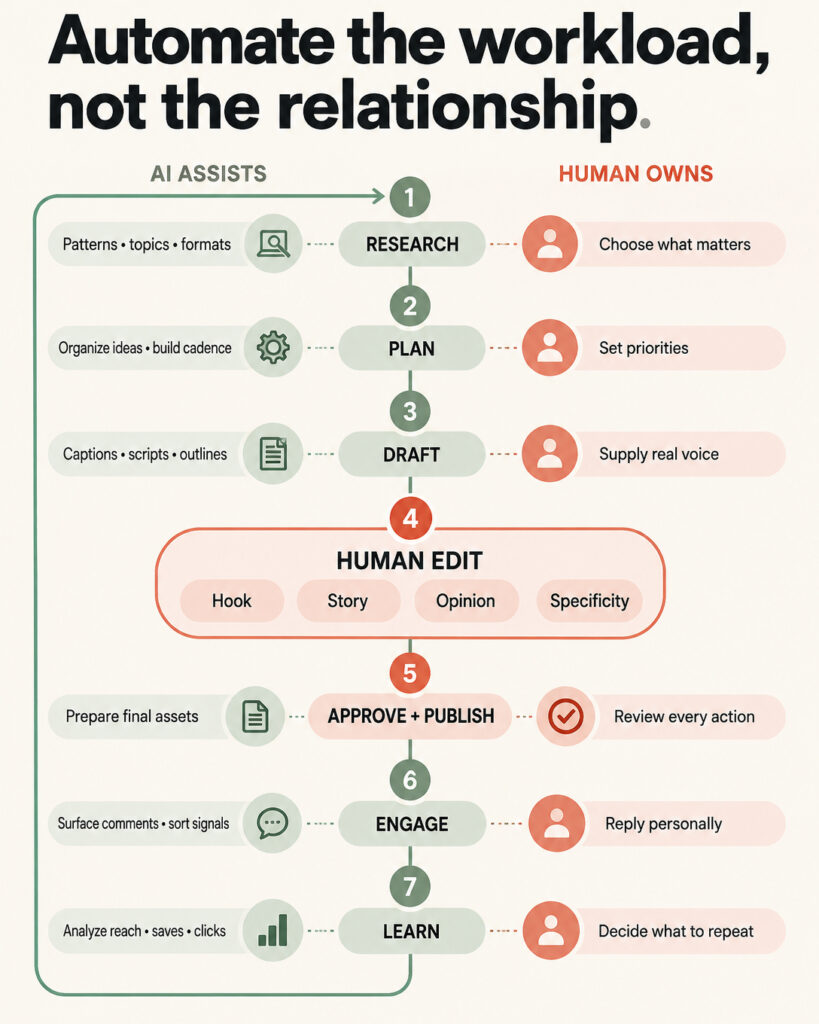
That finding is your workflow. Let Claude draft, then rewrite the hook yourself.
Caption prompt:
“Write 3 caption options for this post: [describe the post]. Match my voice document. Each caption needs a hook under 125 characters, one specific tip, and a soft call to action pointing to the link in my bio. No hashtags in the caption body.”
Reel script prompt:
“Write a 30-second Reel script on [topic]. Structure: 3-second hook, three fast points, one-line close. Write it the way I talk, using my voice document. Include on-screen text suggestions for each beat.”
What to Keep Human
Draw this line clearly and keep it:
-
The first line of every caption. The data says edit it, so edit it.
-
Personal stories. Claude cannot know what happened in your kitchen last Tuesday. Those details build trust.
-
Opinions and recommendations. Your audience follows you for your judgment. Outsourcing judgment hollows out the account.
-
Replies to comments and DMs. Relationships are the asset. Write those yourself.
This matters for trust reasons too. Research shows 52 percent of consumers reduce engagement when they suspect content is AI-generated. The fix is editing, specificity, and keeping your real life in the content.

Workflow 4: Outline Carousel Slides and Repurpose Blog Posts
Carousels are the highest-value format for bloggers because they map directly onto content you already own. Benchmarks put carousels at the top of the engagement table, and AI-generated carousel posts get 3.1x more saves than single-image AI posts.
Here is my favorite move. Open one of your own blog posts in a tab, start a Cowork session, and run:
“Read this blog post. Turn it into a 10-slide Instagram carousel. Slide 1 is a hook under 10 words. Slides 2 through 9 each carry one idea with a headline and a max of 25 words of supporting text. Slide 10 is a call to action sending people to the full post via my link in bio. Give me the exact text for every slide.”
One blog post becomes a carousel, a Reel script, and three caption angles in a single session. That is asset leverage, and it is exactly how you should think about every piece of content you have already published.

Workflow 5: Optimize Your Bio and Link in Bio
Your bio is a landing page with a 150-character limit. Navigate to your own profile and prompt:
“Review my Instagram bio and the top of my grid as a first-time visitor would. Tell me in one sentence what you think I offer. Then rewrite my bio in 3 versions: who I help, what result I deliver, and why they should tap the link. Keep each under 150 characters.”
Then open your link-in-bio page in another tab and ask Claude to review the order of your links against your current goal, whether that is email signups, a product, or your latest post. Small reorder, real results.

Workflow 6: Review Your Professional Dashboard Insights
Open your Professional Dashboard, navigate through your insights, and run:
“Review the insights visible on this page. Identify my top 3 posts by reach and by saves. Tell me what they have in common in format, topic, and hook style. Then give me 5 content ideas that double down on what is already working.”
Do this monthly. The whole point of a system is that it improves with feedback, and this closes the loop between what you planned and what actually performed.

Instagram Automation Rules and Account Safety
This section is where I get strict, because your account is an income-producing asset and I want you to protect it.
Meta allows automation that runs on its official API and supports real interactions: scheduling, keyword replies to inbound messages, lead capture in chat. Meta bans follow/unfollow scripts, mass cold DMs, fake engagement, scraping, and tools that log in with your password. The test Meta applies is simple: did the person act first. The 2026 policy update made the philosophy explicit. Automation that enhances genuine human interaction is tolerated. Automation that tries to replace human engagement is prohibited.
My safety rules for using Claude in Chrome on Instagram:
-
Use it for research, drafting, and analysis. These are reading and writing tasks, and they are safe.
-
Post manually or through official scheduling tools. Keep publishing in your own hands.
-
Never let an agent mass-send DMs or auto-engage with strangers. That is banned behavior regardless of which tool performs it.
-
Keep approval required for sensitive actions in your Claude settings, and watch the session while it runs on a logged-in account.
-
Review everything before it goes live. You are the editor of record.
Follow those rules and you get the speed without the risk.

The System, Start to Finish
Here is the weekly rhythm I recommend:
-
Monday, 30 minutes: hashtag and competitor research session.
-
Monday, 20 minutes: update your calendar for the week.
-
Tuesday, 45 minutes: draft all captions, scripts, and carousel outlines, then edit every hook yourself.
-
Through the week: post, and reply to comments personally.
-
Monthly, 30 minutes: insights review and bio check.
Marketers report saving roughly 3 hours per piece of content created with AI assistance. In my own testing, the real win is smaller and more important: you stop starting from zero. Every session begins with research, context, and your voice already loaded.
Systems beat motivation every time. This is a system.

FAQ
Do I need a paid Claude plan to use Claude in Chrome?
Yes. As of the August 2026 update it is available on Max and Team plans, it is rolling out to Pro, and Enterprise admins can enable it for their teams.
Will Claude post to Instagram for me?
It can interact with pages you have open, with your permission. I recommend against letting it publish. Keep posting manual or use official scheduling tools, and reserve Claude for research, planning, and drafting.
Is using AI for Instagram captions against Meta’s rules?
No. Drafting content with AI is allowed. The banned behaviors are mass cold DMs, follow/unfollow scripts, fake engagement, scraping, and tools that require your password.
How do I keep the captions from sounding like AI?
Build a voice document with real examples of your writing, paste it into every session, and rewrite the first line of every caption yourself. Add specific personal details Claude cannot invent.
Can Claude read my Instagram analytics?
It can read whatever page you have open, including your Professional Dashboard. Open your insights, then ask it to summarize top performers and suggest content ideas based on them.
Is this safe for my account?
Yes, when you use it for research and drafting, keep approval settings on for sensitive actions, watch the session while it runs, and avoid any form of automated outreach to strangers.
Your Instagram account is a distribution channel for your blog and a path to the income you are building. Give it a system, keep the human parts human, and let the agent handle the grunt work. If you want the full framework for turning content into income, start with the free resources on Weekend Side Hustle, and come back next week for the next platform in this series.