
Phone hacks are one of the most reliable content types on TikTok. Everyone has a phone, almost nobody knows all its features, and a good tip gets saved and shared instantly. Here are 40 mobile phone tips and tricks TikTok content ideas for iPhone and Android, plus how to film them so they’re easy to follow.
This is part of our complete guide to TikTok content ideas.
Why phone tips perform so well
- Huge audience: anyone with a phone is a potential viewer.
- Saveable: people bookmark tips to try later.
- Shareable: “Mom, you need this.”
- Faceless-friendly: screen recordings do the work.
- Endless: every software update brings new features to explain.
40 mobile phone tips and tricks TikTok content ideas
Hidden settings
- Settings everyone should change on a new phone
- Hidden accessibility features that are actually useful
- Back Tap on iPhone (double-tap the back for a shortcut)
- Android’s hidden developer options (safely explained)
- How to turn your phone into a magnifier
- Do Not Disturb and Focus modes explained
- Customize your lock screen
Camera tricks
- Use the volume button to take photos
- Grid lines for better composition
- Portrait mode tips
- Night mode photos
- Scan documents with your phone
- Copy text from a photo
- Remove the background from a photo
Battery and storage
- Battery-saving settings
- Find what’s draining your battery
- Free up storage in two minutes
- Offload unused apps
- Clear cache safely
Productivity
- Text replacement shortcuts
- Widgets that save time
- Keyboard tricks (cursor control, one-handed mode)
- Split screen on Android
- Shortcuts automations for daily routines
- Share Wi-Fi passwords instantly
- Voice typing and dictation tips
Privacy and safety
- Privacy settings to change today
- Hide photos and apps
- Check which apps use your location
- Set up Medical ID or emergency info
- Spot scam texts
Creator-focused phone tips
- Best camera settings for filming TikToks
- How to film steady video without a gimbal
- Free editing apps (CapCut and more)
- Record your screen with sound
- Lighting tricks with just your phone
Pair these with our content creator tools list.
Fun and entertainment
- Easter eggs hidden in your phone
- Phone tricks your kids don’t know
- iPhone vs. Android: who does it better?
- Rating viral phone hacks: real or fake?
Sample scripts you can copy
Battery tip (iPhone): “Your iPhone battery dies fast? Go to Settings, Battery, and check which apps use the most. Then turn off Background App Refresh for the ones you don’t need. Follow for one phone tip a day.”
Copy text from a photo: “Did you know your phone can copy text right out of a picture? Open the photo, press and hold on the words, and tap Copy. Works on menus, signs and screenshots.”
Android split screen: “Watch a video and text at the same time. Open Recent Apps, tap the app icon, choose Split screen, then pick your second app.”
Menus vary by phone model and software version, so always test the steps on your own device before you film.
Series ideas that keep people following
- “One phone tip a day” (number every video)
- “iPhone vs. Android: who does it better?”
- “Phone settings for parents”
- “Tech tips for grandparents” (very shareable)
- “New update, new features” after each major release
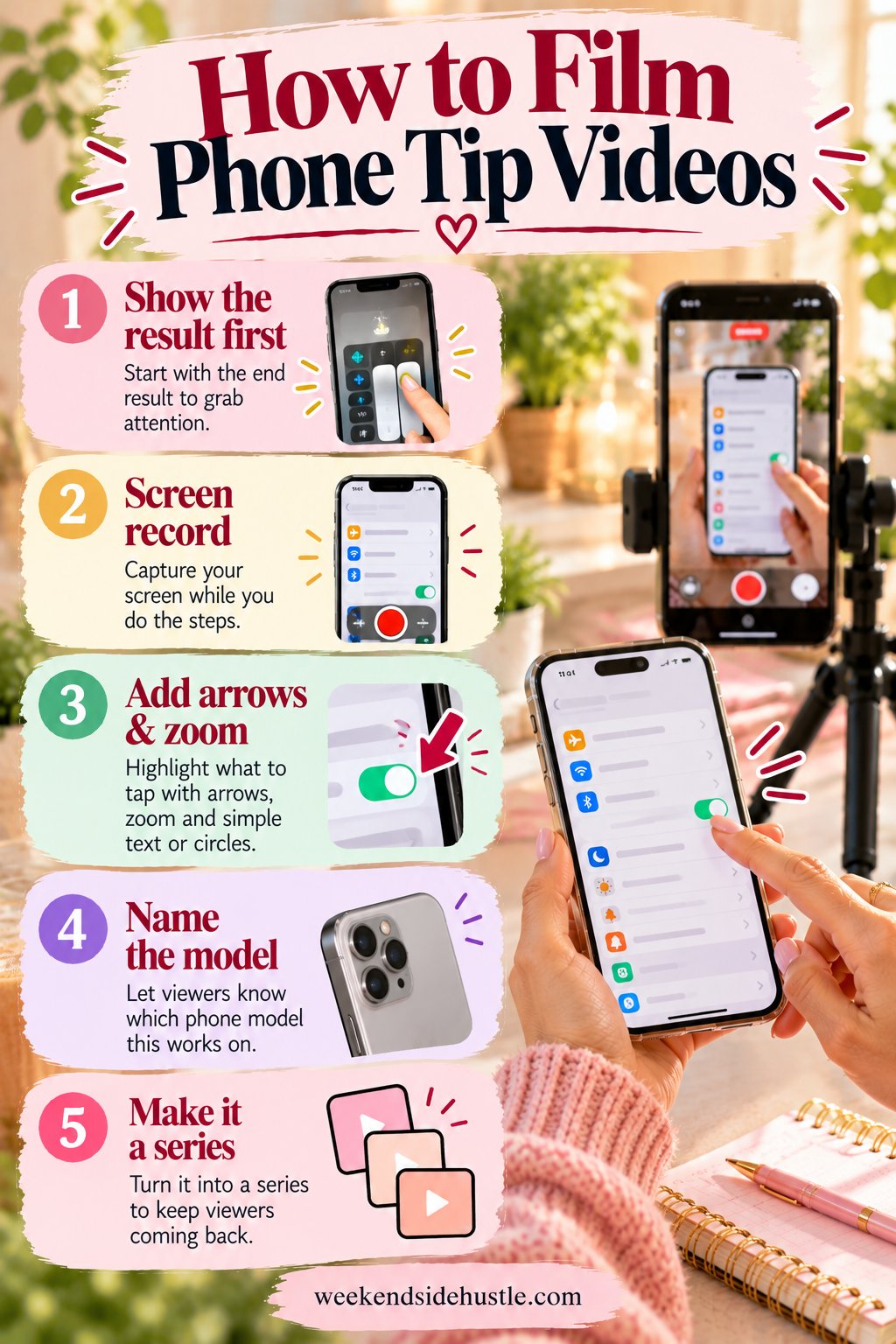
How to film phone tip videos
- Start with the result: “Your iPhone can do this?”
- Screen record the steps, then speed up slow parts.
- Add arrows and zoom so viewers see exactly where to tap.
- Say the phone model and software version to avoid confused comments.
- Save it as a series: “Phone tip #12.”
Screen recordings make this a perfect faceless niche. See faceless TikTok content ideas.
Mistakes to avoid in phone tip videos
- Going too fast. Viewers need to see where to tap. Slow down on the key step.
- Not naming the device. “This only works on iOS 17 and up” saves a lot of confused comments.
- Clickbait without payoff. If the hook promises a “secret,” deliver it quickly.
- Risky advice. Skip tips that could break warranties or compromise security.
- Cluttered screens. Clear your notifications and use a clean wallpaper before recording.
Ways to monetize phone tips content
- Affiliate links for phone accessories (see TikTok Shop content ideas)
- App and tech brand sponsorships
- TikTok’s Creator Rewards Program for videos over one minute
- LIVE tech help sessions (see TikTok LIVE content ideas)
Get your content organized
The Social Media Planner for Content Creators has 21 printable pages, including an Instagram post planner, a Pinterest board tracker, a YouTube analytics tracker and a weekly content tracker.
FAQ
Are phone hack videos still popular on TikTok?
Yes. “Mobile phone tips and tricks” is one of the most searched TikTok content idea phrases, and each software update creates new demand.
Do I need to show my face for phone tip videos?
No. Screen recordings with on-screen text or a voiceover work great.
Should I focus on iPhone or Android?
Pick the phone you know best. You can do occasional comparison videos to reach both audiences.
Back to the full TikTok content ideas guide.